Aviation
Put your panel in the picture
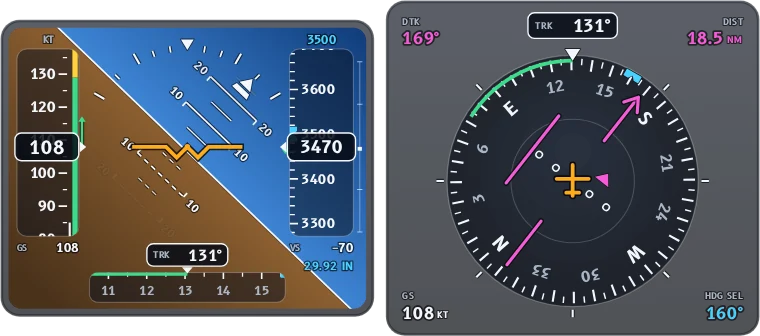
Data Overlay reads the track log from ForeFlight or your GPS and draws a glass attitude indicator and HSI, the classic six-pack and a moving map that fly along with your cockpit footage.
Free trial, then from $19.99 a month, $79.99 a year or $129.99 once. See pricing
Live demo
Try Aviation mode right here
This is the real app running in your browser on a sample flight. Turn gauges on and off, drag them around, change units and colours, and scrub through it. Opening your own files and exporting happen in the desktop app.

Sample data only. Works best on a computer. Open the demo full screen
What it shows
Every gauge in Aviation mode
Start with the main gauges, add the essentials, or turn on everything. Size, move and colour each one, in imperial or metric units.
Glass
- Attitude
- HSI
Classic six-pack
- Airspeed
- Attitude
- Altimeter
- Turn coord.
- Heading
- Vert. speed
Map
- Moving map
- Sync on wheels-up or touchdown. Pause on the frame, click, then nudge by a tenth of a second.
- Recorded attitude when you have it. Logs from an AHRS, such as a Stratus or Sentry with ForeFlight, add the recorded bank and pitch.
- Wind correction. Enter the wind to show estimated airspeed and heading.
- Your aircraft’s V-speeds as bugs on the airspeed tape, plus baro setting, selected altitude and a heading bug.
- GPS course and distance to your destination on the HSI.
- Pick one flight from a day with several legs, or export the whole log.
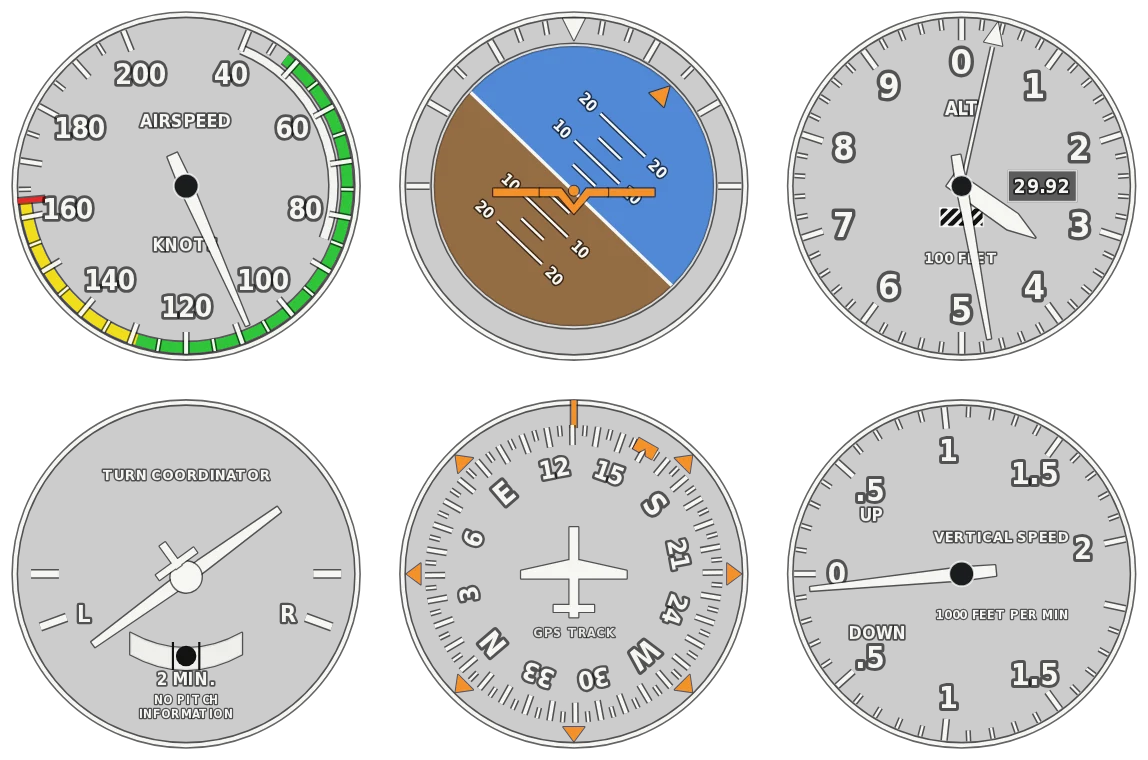
From a GPS track alone, the airspeed tape shows groundspeed and the attitude is estimated from your turns and climbs.
Your files
Works with the log you already have
- ForeFlight track logs as CSV, KML or GPX
- Other flight apps and GPS units GPX, KML or CSV track logs
Reads GPX, KML and CSV track logs
Tip
Export the track log from ForeFlight as CSV or KML. Those can carry the recorded bank and pitch; GPX can’t.
Combine files
Use more than one file at once, for example the track log from ForeFlight and a second GPS logger. Each gauge uses the best file that has its data, and each file gets its own clock offset.
Built for the edit
Made to drop straight into your timeline
- ProRes 4444 · PNG MOV · PNG sequence
Transparent, frame-exact exports
ProRes 4444 with alpha on a Mac, or lossless PNG on either platform. Export at your sequence’s frame rate and the overlay has exactly as many frames as your clip.
- ±0.1 s
Sync to the frame
Nudge each file’s clock in tenths of a second until the gauges match the picture. Files recorded on a local clock are lined up with UTC files for you.
- Best source for each gauge
Combine files
Take GPS from one device and heart rate or power from another. Each gauge uses the best file that has its data, with a clock offset for each file.
- Row · Stacked · Panel · Custom
Arrange it your way
Drag gauges anywhere with snapping guides, size each one, pick colours and units, and undo any change. The export frame fits your arrangement.
- Every CPU core
Fast, even for long days
Exports use every core, so an hour of footage renders in minutes. On Macs with a ProRes engine, encoding runs in hardware.
- Local processing
Your files stay on your computer
Logs and videos are read and rendered on your own machine. Nothing is uploaded.
Try it on your own flight
The free trial is the full app with every sport. Exports are 5 seconds long with a watermark until you buy. From $19.99 a month, $79.99 a year or $129.99 once.